


German Electric Screwdriver Set Hand-Automatic Rechargeable Screwdriver Small Household Electric Batch Lithium Battery Tool
German Electric Screwdriver Set Hand-Automatic Rechargeable Screwdriver Small Household Electric Batch Lithium Battery Tool
-
Ordered
- - -
Order Ready
- - -
Delivered
Couldn't load pickup availability

German Electric Screwdriver Set Hand-Automatic Rechargeable Screwdriver Small Household Electric Batch Lithium Battery Tool



Get to the screw. Skip the struggle.
That loose cabinet hinge shouldn't turn into an afternoon project. When a straight screwdriver runs out of room, a pivoting head gives you another way to line up the bit and finish the job with less fuss.
Not enough room for the handle.
A cabinet wall, drawer side or furniture frame can block the body of a straight tool before the bit lines up.
Turn the head to fit the space.
Choose a position that leaves room for your hand while keeping the bit pointed toward the screw.

Different jobs. Different angles. One tool.
Choose 0°, 30°, 60° or 90° to change the approach without swapping tools. Each fixed position is intended to help you work around a different obstacle.
Tap an angle to see when it helps.
0° Straight
Perfect for the everyday screws you can reach head-on, such as open furniture panels and workbench projects.
30° Slight offset
Shift the handle just enough to work around a nearby rail or panel while keeping the bit lined up.
60° Angled
Useful when furniture edges leave too little clearance for a fully straight approach.
90° Right angle
Bring the screwdriver into cabinet corners and tight spaces where the side panels leave little room for the handle.

Gentle when you need control. Faster when you're ready to move on.
Small furniture fittings and everyday screws shouldn't all be driven the same way. Pick a torque level that suits the job, then use a lighter press for more deliberate driving or press fully when you want to move through routine fasteners.
What's the difference between torque and speed?
Torque controls how much turning force the screwdriver applies. Speed controls how fast the bit rotates. This tool has five torque settings and two press-based speeds, so you can adjust both to suit the fastener and material.

Cabinet corners don't come with great lighting.
It's much easier to keep the bit on a screw when you can actually see it. The built-in LED lights up the immediate work area, making drawer corners, lower cupboards and the space beneath a desk less frustrating to tackle.
Don't let the next screw head stop the project.
For this 30-piece bundle, the assortment covers four common bit profiles, giving you more options for furniture assembly and everyday repairs. Keep the bits you need close at hand instead of hunting through a toolbox halfway through a project.
Cabinet hinges
Get closer to screws near cupboard walls and awkward hinge hardware.
Flat-pack furniture
Work through the many fasteners on desks, shelves and storage furniture.
Drawers & runners
Reach hardware inside frames without wrestling a long straight handle.
Home workspaces
Handle light fastening around desks, workbenches and organizers.
How does the pivoting head adjust?
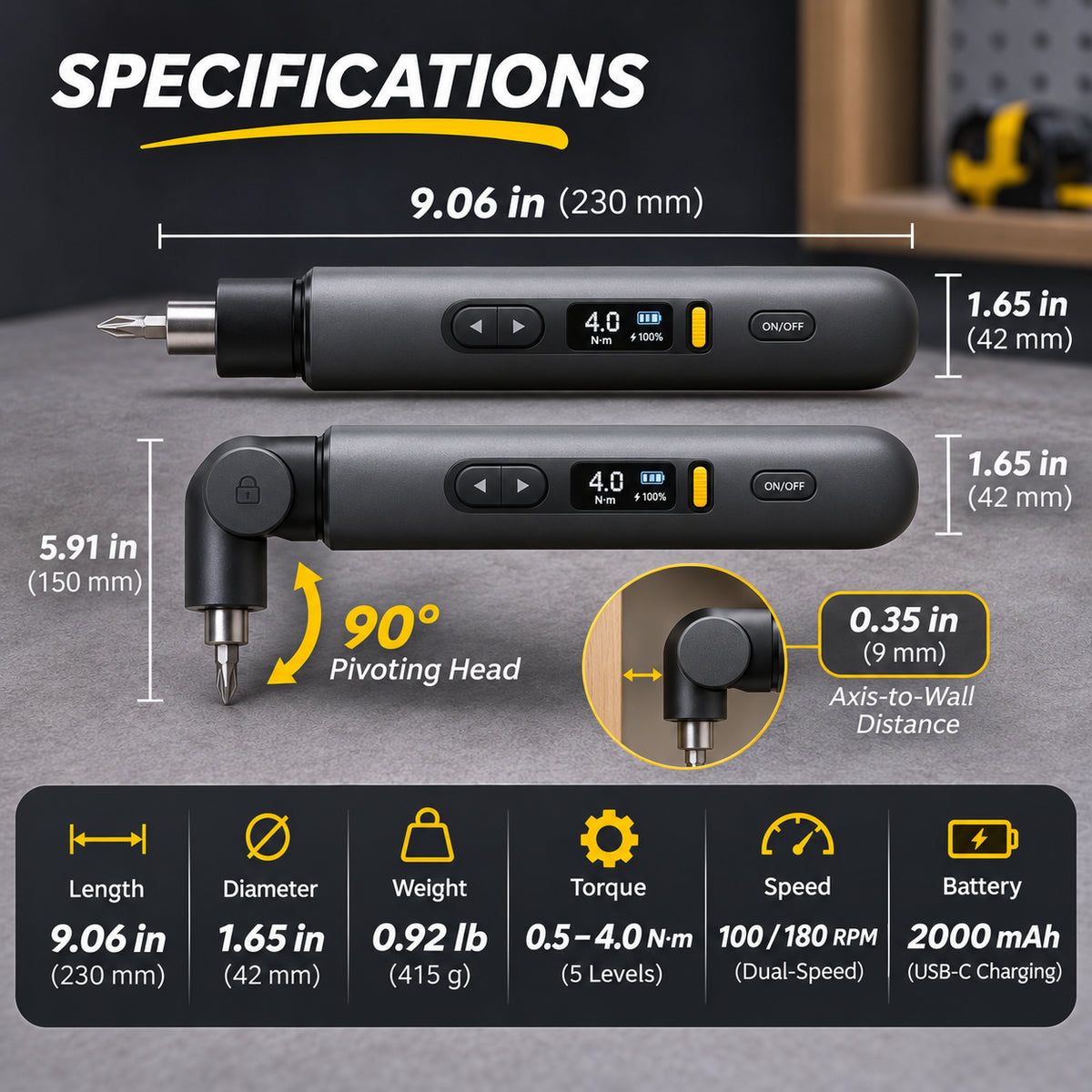
Press the release at the pivot joint, move the head into the angle you need and release it to lock in place. There are four fixed positions: 0°, 30°, 60° and 90°.
Can it reach every corner?
No tool can fit every space. This design helps with many awkward screws, but it still needs enough clearance for the head, bit and your hand.
Is the five-level control for speed or torque?
The five settings are torque levels, from 0.5 to 4 N·m. The tool has two speeds controlled by how firmly you press the drive control: about 100 or 180 RPM.
Can it drill holes in wood or walls?
It's made for driving and removing suitable screws, not for drilling new holes. Use a dedicated drill and the correct bit when you need to create a hole.
Can the light help inside dark cabinets?
Yes. The integrated LED is positioned to illuminate the bit and immediate screw area while you work.
What about stubborn or rusted screws?
The powered torque tops out at 4 N·m. Heavily seized bolts or high-torque construction fasteners may require a stronger tool.
What's included in the bit selection?
The 30-piece bundle shown here contains 5 slotted bits, 5 Phillips bits, 7 hex bits and 13 Torx bits. Please check that the selected bundle matches the kit contents shown on your order.
Make the next awkward screw a smaller problem.
Four useful head positions, adjustable torque, two driving speeds, a built-in work light and a bit selection for everyday projects. See the options at the top of the product page to choose the right set for you.
↑ Back to the product overview